Grumpy Cat Weather
Weather Creative Inc.Weather
4.95.23K Reviews
- Version
- 6.2.7
- Installs
- 100.00K
- Age Rating
- Teen
Screenshots
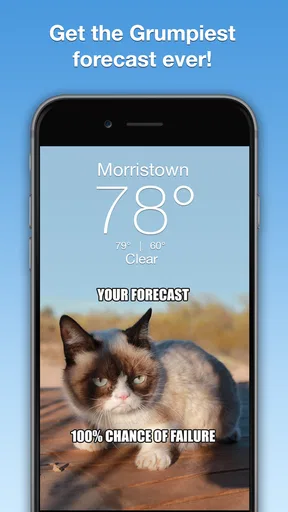
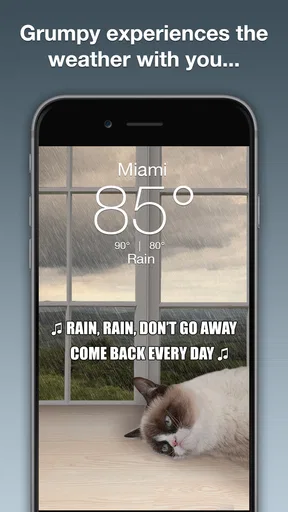
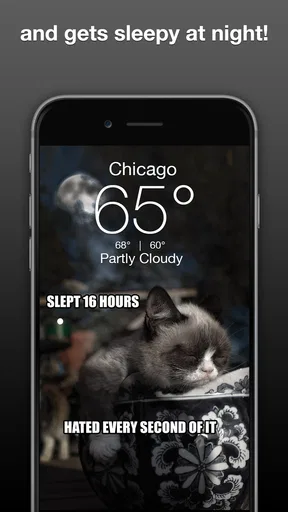
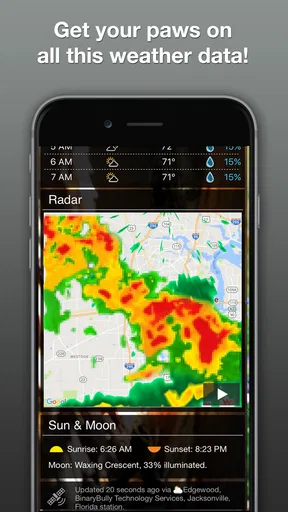
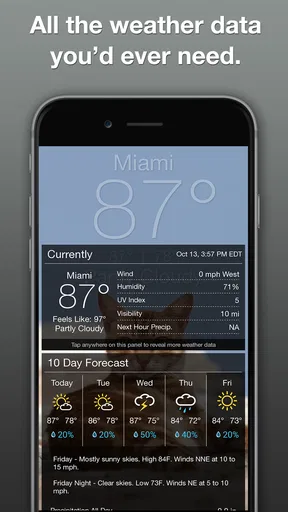
Our Review of Grumpy Cat Weather
 Analysis by Appyee
Weather apps usually try to make the forecast feel calm, precise, and reassuring. Grumpy Cat Weather takes the opposite route: it turns checking the sky into a small joke, using the famously unimpressed cat persona to react to everyday conditions. After spending time with it, my view is straightforward: this is best understood as a lighthearted weather companion rather than a complete replacement for a serious forecasting service. It makes a routine task more enjoyable, but its real value depends on whether you want personality alongside the forecast.
The app is free to download, belongs to the weather category, and comes from Weather Creative Inc. Its average rating is 4.9 from around 19 thousand ratings, with roughly 5.2 thousand written reviews and over 100 thousand installs. Those figures suggest that its unusual tone has connected with a sizeable audience, although popularity alone does not make a weather tool suitable for every situation.
What using the app feels like day to day
The central appeal is immediate. Instead of opening a plain screen filled with symbols and numbers, I get a forecast experience shaped around Grumpy Cat’s attitude. A sunny day can feel like a grudging approval, while unpleasant weather receives the kind of reaction the character is known for. That framing is simple, but it changes the habit of checking the weather from a purely functional action into something I am more likely to enjoy repeating.
That matters most for casual checks. Before leaving for work, deciding whether to walk, or wondering if an outdoor plan is sensible, I do not always need a dense meteorological dashboard. I often want a quick indication of what the day looks like, followed by a little entertainment. This app understands that moment better than many conventional alternatives, which can feel interchangeable and overly serious.
The humor is not a substitute for useful information, though. I still need to read the forecast rather than relying only on the cat’s expression or attitude. The personality layer is a presentation choice, not a guarantee that every decision can be made without looking at the actual weather details. That distinction is important if you are considering it for travel, commuting, exercise, or anything where conditions have real consequences.
One of the app’s strongest qualities is its low mental effort. I can open it for a quick glance without feeling as if I have entered a technical instrument panel. The design concept is easy to understand even for someone who does not enjoy weather terminology. A child, teenager, or family member who normally ignores forecast apps may be more willing to look when the information is paired with a recognizable character and a playful reaction.
At the same time, the Teen content rating is worth keeping in mind for households choosing apps together. It is not presented as a strictly child-focused weather tool, so parents who want a very plain, educational interface may prefer something more conventional. For older users, the rating should not be a major obstacle, but it reinforces the idea that the app is entertainment-led rather than designed as a formal safety instrument.
The personality is more than decoration
In my experience, the character theme works because it gives the forecast a memorable voice. Most weather apps are easy to forget after closing them. Here, the reaction is the part I remember, and that can make the app feel more personal than a standard screen of icons. I can imagine sharing the result with a friend or opening it simply to see how the app treats an especially miserable morning.
That also creates a useful social angle. If one person in a household enjoys the humor while another only wants practical information, the app can become a quick shared check rather than a solitary utility. It is not a collaboration tool, but its tone gives people something to comment on. A forecast that prompts “the cat hates this weather” is more conversational than a generic rain symbol.
The trade-off is that the joke can become less effective with repeated use. A novelty-based interface has to earn attention again and again, and not every reaction will feel fresh after weeks of checking. I would not choose this app solely because of the character if I expected to spend a long time studying forecasts every day. The charm is strongest during short visits.
How I would use it in a realistic routine
Imagine a weekday morning when I need to decide whether to cycle or take public transport. I would open the app for the quick mood-setting view, check whether the conditions look comfortable, and then make a practical decision based on the displayed forecast rather than the joke alone. If the weather looks uncertain, I would verify it with a more detailed service before committing to a long ride. That two-step workflow is where this app makes sense: it handles the friendly first glance, while a more technical source handles the final judgment.
For a weekend picnic, I would use it slightly differently. The app could make planning feel less tedious, especially when checking several times during the day. If the outlook turns unpleasant, the grumpy reaction adds a bit of humor to the disappointment. However, I would still want a conventional forecast for timing, changing conditions, and any safety-sensitive details. The app is enjoyable at the planning stage, but I would not make it my only authority for an important outdoor event.
A less obvious use is as a habit builder for people who routinely forget to check the weather. The personality gives the action a small reward, which may encourage a glance before leaving home. That can be genuinely useful for choosing a jacket, carrying an umbrella, or adjusting a commute. The benefit is not advanced forecasting; it is making a basic piece of information easier to remember.
Where it compares well with ordinary weather apps
Compared with a standard weather app, this one wins on character and approachability. Traditional tools often prioritize maximum detail, maps, charts, alerts, and layers of settings. Those are valuable when I need them, but they can be excessive when I simply want to know whether I should leave now or wait. Grumpy Cat Weather feels less intimidating and more inviting for quick checks.
It also has a clearer identity than many generic forecast products. A conventional app can be technically capable yet emotionally forgettable. This one has a consistent idea from the moment it opens: the weather is being judged by a famously dissatisfied cat. That focus gives it a reason to exist beyond reproducing the same basic screen found elsewhere.
But the comparison changes when the need becomes serious. A dedicated weather service is usually the better choice for users who need extensive forecasting context, professional-style tools, detailed location planning, or a broad set of controls. I would also favor a more conventional option if I needed to compare several forecast models or wanted a screen optimized for prolonged reading. This app is not trying to replace that experience, and judging it by those standards would miss its purpose.
The limitations I noticed before recommending it
The first limitation is the balance between entertainment and clarity. A strong visual personality can draw attention away from the information that matters. If I am rushing out the door, I need to make sure I am reading the actual forecast and not just reacting to the character. The app’s humor is helpful when it encourages engagement, but less helpful if it becomes the only thing I remember.
The second issue is that novelty does not suit every user. Some people want weather information with no extra mood, commentary, or visual theme. For them, the character may feel like an unnecessary layer between the question and the answer. If your ideal weather app is quiet, dense, and entirely practical, this will probably feel more playful than useful.
There is also a financial consideration despite the free entry point. Optional in-app purchases range from $1.99 to $29.99 per item. That does not make the initial download expensive, but I would pay attention to any optional purchase screen and decide whether the extra content is worth it for my usage. Someone who only wants a quick forecast may be perfectly satisfied without spending anything, while a dedicated fan could be more tempted by the paid additions.
Another practical point is compatibility. The app supports Android devices running version 7.0 or later, which covers many older phones but does not mean every device will provide the same experience. If you are using an older handset, I would expect performance to depend partly on the phone itself. The current version is 6.2.7, so users who care about keeping apps aligned with a particular device setup should check compatibility before relying on it as their main weather tool.
I also would not treat the app’s high rating as proof that it is universally accurate or ideal for every forecast need. A rating of 4.9 reflects strong user satisfaction, but people may be rewarding the humor, design, and overall enjoyment as much as the practical weather function. That is a positive sign for its intended audience, not a reason to ignore its narrower role.
Who will get the most from it
I think it is a particularly good fit for someone who finds ordinary weather apps dull. If you enjoy character-driven apps, want a more cheerful morning routine, or like sharing small jokes with friends, the presentation gives you something that a plain forecast screen cannot. It is also a sensible choice for casual users who need quick daily information without wanting to learn a complicated interface.
Families may appreciate it as an approachable way to get children or teenagers interested in checking conditions before going out, although the Teen rating means adults should make their own suitability judgment. The app can also work well as a secondary weather tool: something fun for everyday glances, kept alongside a more detailed service for travel, storms, hiking, or other plans where precision and depth matter more than personality.
I would skip it if my priority were comprehensive weather analysis. It is not the right first choice for someone who wants a serious planning dashboard, detailed environmental data, or a highly customizable professional workflow. I would also skip it if I dislike branded character humor or find repeated jokes distracting. In those cases, a straightforward weather app will probably feel faster and more respectful of your attention.
Small workflow tips that make the concept work better
My first tip is to use it at the start of your decision process, not necessarily at the end. Let the app answer the casual question—“What kind of day is this?”—then switch to a more detailed source if the decision involves distance, safety, or a fixed appointment. This preserves the fun without asking the app to do a job it was not designed to dominate.
Second, make the character reaction a reminder rather than a forecast substitute. If the app gives an especially negative impression, take that as a prompt to inspect the actual conditions more carefully. The emotional response can help me notice the forecast, but I still need to interpret temperature, rain, and timing in practical terms.
Third, keep the free experience in perspective before exploring purchases. Since the app is free and optional items can cost from $1.99 up to $29.99 each, I would use it for several ordinary routines first. That makes it easier to judge whether the humor remains useful after the initial novelty fades, rather than paying because the character is immediately appealing.
Finally, treat it as a mood-friendly utility. Its best moments are short and repeated: opening it before breakfast, checking again before leaving, or showing someone the reaction to an unpleasant forecast. It is less convincing when I expect a long research session. That difference explains both its charm and its limits.
My final recommendation
Grumpy Cat Weather succeeds because it gives a familiar task a distinct personality. Weather Creative Inc. has built an app that feels approachable, memorable, and easy to revisit, and the strong user response supports that impression. I like it most as a quick daily companion that makes checking conditions less mechanical.
My recommendation is therefore specific rather than universal. Choose it if you want a free, character-driven weather experience and are happy to pair its playful presentation with common sense or a more detailed service when plans matter. Skip it if you need a serious all-in-one forecasting instrument or prefer information without a layer of humor. For the right user, the grumpiness is the feature; for everyone else, it may simply be extra decoration.
The best reason to install it is not that it replaces every weather app, but that it makes you more willing to check the weather in the first place. That is a modest purpose, yet it is a useful one, and the app delivers it with enough personality to stand apart from the usual alternatives.
Verdict
Strengths of Grumpy Cat Weather
- Playful Grumpy Cat artwork makes routine forecasts more entertaining.
- Provides quick access to current conditions and upcoming weather details.
- Simple layout is easy to understand for casual users.
- Useful for checking weather before commuting or planning outdoor activities.
- Lighthearted presentation can make daily forecast checks less boring.
Limitations of Grumpy Cat Weather
- Weather accuracy may vary depending on the location and data source.
- The humorous theme may feel repetitive after extended use.
- Some locations may have limited forecast detail or coverage.
- Potential notifications can become distracting if enabled frequently.
- The app may feel dated on newer devices or operating system versions.
Other Releases by Weather Creative Inc.
View All
Weather Puppy - App & Widget
Weather4.9

Weather Kitty - App & Widget
Weather4.9

Weather BUB
Weather4.9

Wildlife Weather
Weather4.7
Similar Picks in This Category
View All
Weather - By Xiaomi
Xiaomi Inc.4.1

Weather & Radar Forecast
WetterOnline4.8

Weather
OneLouder Apps4.6

AccuWeather: Weather Radar
AccuWeather3.6

The Weather Channel - Radar
The Weather Channel4.6

1Weather Forecasts & Radar
OneLouder Apps4.3
Frequently Asked Questions
What is Grumpy Cat Weather?
Grumpy Cat Weather is a weather app built around the popular Grumpy Cat character. It presents current conditions and forecasts in a playful, humorous style instead of using a purely formal weather interface. Depending on the version and device, it may show temperatures, precipitation information, forecasts, and location-based weather details, with themed messages and visuals designed to make checking the weather more entertaining.
What weather information does Grumpy Cat Weather provide?
The app is primarily intended to provide everyday weather information, such as current temperature, general conditions, and forecast details for a selected location. Some versions may also include additional data such as highs and lows, wind, humidity, or short-term forecasts. Users should check the current store listing because available features, forecast length, and data presentation can vary between app versions and platforms.
Does Grumpy Cat Weather require location access?
Location permission may be requested so the app can automatically display weather for your current area. You do not necessarily need to grant this permission if you prefer to search for or enter a location manually, although the exact options depend on the version installed. Before accepting access, review the permission prompt and your device settings. You can usually change location permissions later through Android or iOS privacy controls.
Is Grumpy Cat Weather free to download and use?
Availability and pricing can differ depending on the platform, region, and current version of the application. The app may be offered as a free download, but advertisements, optional purchases, or limited features could be present. Always review the Google Play Store or Apple App Store listing before downloading to confirm the price, in-app purchase details, subscription information, and whether the app has any advertising or other usage restrictions.
Is Grumpy Cat Weather still worth downloading?
Grumpy Cat Weather may appeal to users who want a lighthearted way to check basic weather conditions and enjoy the character-themed presentation. It is best suited to casual daily use rather than advanced meteorological analysis, severe-weather monitoring, or highly detailed forecasting. Before installing, consider whether the app is actively maintained, compatible with your device, and supported in your region, since older themed apps may have limited updates or discontinued services.
